Complete Gaea 3 feature list, including export features planned for the final release and forecasted features in future updates.
Gaea 3.0 Early Access now available for everyone!
Gaea 3.0 Early Access!
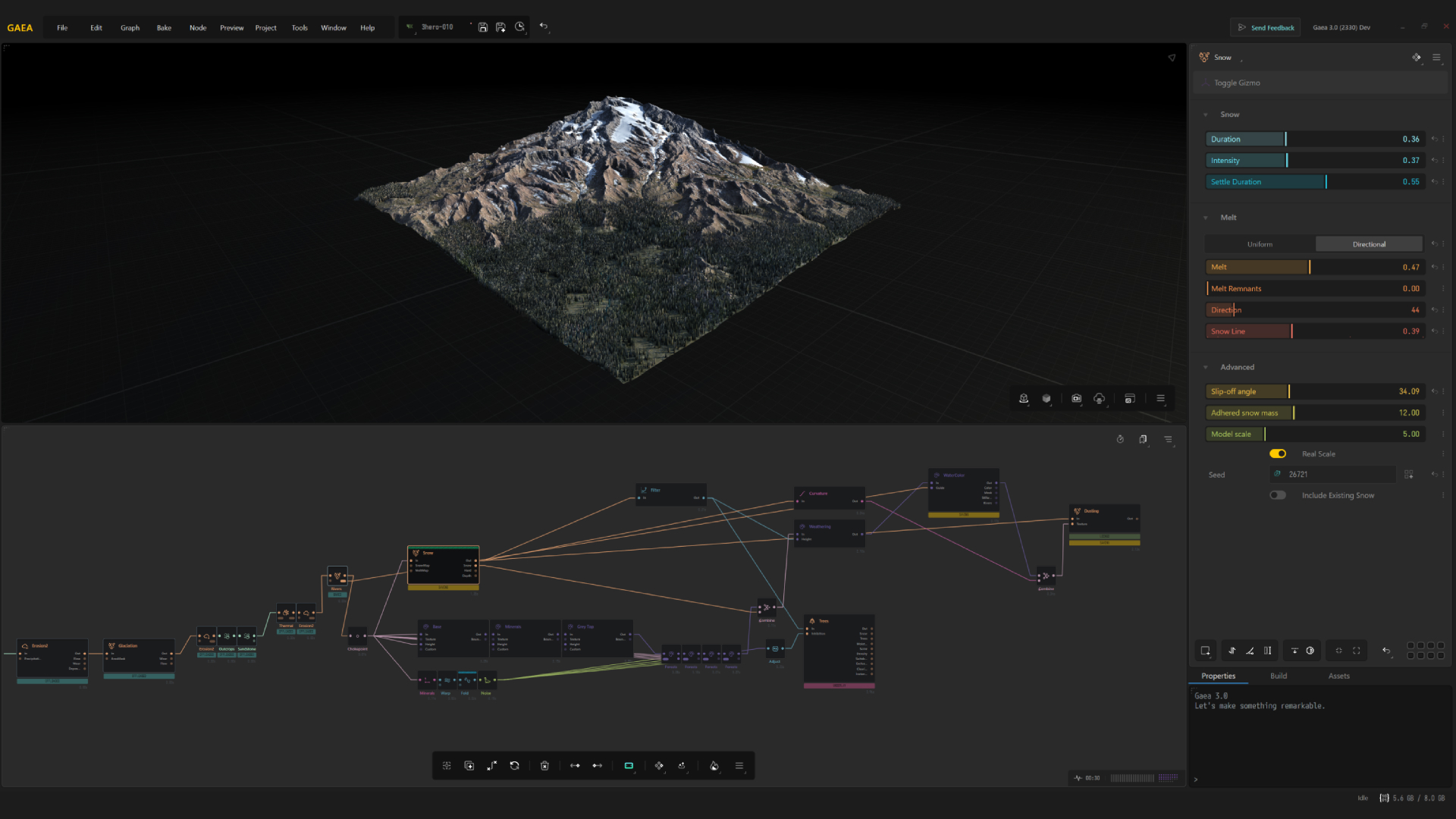
The next generation of terrain design is ready to explore!
Gaea 3 is now available as a Public Beta as it has reached Release Candidate status and considered generally stable.
Discover an expansive range of powerful new tools - including Dune Simulation, 8K Previews, new Terrain Primitives, new sophisticated Colorization system, spline-based Rivers and Roads, Glaciation, and enhanced erosion tools. Enjoy a significantly faster engine; redesigned, customizable interface; refined artistic controls; advanced terrain visualization; and more efficient workflows for building large worlds.
With development nearing completion, we invite you to experience Gaea 3, put its new capabilities to work, and share your feedback as we prepare for the official release on December 4.
Feast on the comprehensive list of new features at the end of this page.
Pre-Order Gaea 3.0
Order Gaea 2.0 before December 4 and get Gaea 3.0 for free.
Gaea 2.0 will be retired once Gaea 3.0 is released. Now is a great opportunity to get both versions for the price of one!
Advanced Surfaces
Bring sophisticated realism and depth to your terrains with intricate fracturing, distinctive geological formations, and triplanar mapping. Build richly layered surfaces with natural complexity and striking visual fidelity.
Terrains
Shape landscapes with greater freedom and precision using new Terrain Primitives, expanded parametric shapes, and terrain generators. From dramatic sandstone cliffs to glaciated mountains, craft evocative landforms with exquisitel detail and artistic control.
Vector Tools
Turn your vision into reality with Gaea 3’s intuitive vector-based tools and versatile parametric shapes. Draw and and refine rivers, roads, and complex landforms with remarkable accuracy and ease.
Simulations
Bring worlds to life through dynamic, physics-driven natural processes. Gaea 3 introduces unprecedented Dune Simulation, procedural river systems, roads, and vegetation growth. Your terrains will be more varied and believable than ever.
Color
Transform your terrains with a completely reimagined Colorization system that offers exceptional flexibility, precision, and artistic expression. Custom CLUTs, intuitive controls, and expanded rendering capabilities open new possibilities for creating rich, vibrant, and nuanced environments.
Workflow
Create more, faster, with a dramatically accelerated engine and redesigned, customizable interface. Walk on the wild side with stunning 8K Previews, First-Person Camera, enhanced terrain visualization, flexible workspaces, myriad new quality-of-life conveniences, and detailed performance insights that keep your creativity flowing smoothly and without interruption.
Pre-Order Gaea 3.0
Order Gaea 2.0 before December 4 and get Gaea 3.0 for free.
Everything in Gaea 3
Nodes
-
Create
-
New Primitives
- Mountain
- Parametric
- Shape
-
New Surfaces
- Fracture
- Cliffs
- Rockfield
- Vector Drawing
- Roads
-
New Primitives
-
Simulate
- Dunes
- Glaciation
- S-Rivers
- Thermal Erosion 3
- Redesigned Growth/Tree
- Triplanar Displacement
-
Colorize
-
Unified Colorization System
- CLUT/Gradient Capture
- SatMap Editing
- User Gradients
- Sort and Filter by Color Science
- Search by Similarity
- Customizable SatMap List
- Built-In Mask System
- Built-In Natural Color Production
- Mineral Layers
-
Unified Colorization System
-
Other Nodes
- DetectEdges
- FloodFill
- Fuzz
- Improved Curve UI
- RGB Unified Utility
- Unified Import node for File and Object
-
Export
- OCIO Color Processing
-
New Mesh export options
- UDIM support
- Tiled Mesh Output
- Improved Gaea RAW format
- Many existing nodes were improved in minor ways.
- Node consolidation for easy discovery
Workflow
- Per-node Resolution
-
Improved Graph
- Stacks
- Improved Groups
- Gaea-1 style Toolbox is back
- Context-Sensitive Toolbar
- Improved Node Readouts
- Node and Connection custom color-coding
-
New Viewport
- First-Person Camera
- On-Screen Controls
- New Gizmos
- Improved Mask Visualization
-
Build-Quality Previews
- 8K Live Previews
- 8K On-Demand Previews
- Improved Measurement Tools
-
Renderer 3.0
- Global Illumination
- Improved Terrain Visualization with Gradients
- Built-in Color Erosion to display flows
- Adaptive Debounce*
User Experience
- Redesigned for Multiple Screens
- Improved Start Experience
- Connections Explorer for fine-precision
-
Global Command Bar
- Favorite Commands
-
Customizable UI
- Dockable Interface
- Pre-built Layouts
- Saving Custom Layouts
- Customizable Shortcodes
- Customizable Search Priorities
- Memory Dots for Camera
- Memory Dots for Property Area
- Searchable Upgrade Guide
- Share Presets, Assets, and entire terrains with custom links
-
Dedicated Explorer Panels
- Terrain / Nodes
- Build Settings
- Assets
- Variables
- Connection
- Readouts
-
Several new process and UI Options
- Highlight new nodes
- Prioritize usage in search results
Build
-
UI-based Build Swarm
- Ability to review and change settings before building.
- Launch builds from Start Window.
- Improved Command Line Swarm
- OCIO Processing for EXR exports
Advanced
- 2.7D Displacement / Triplanar Displacement
-
Advanced Statistics View
- Build Estimates
- Memory Consumption
- Deep Analysis
- New Terminal for Developers and Power-Users
- Advanced Debugging and Checking tools for Variables based Workflows
On the roadmap
- Clipped Terrain Export
- Build Stack
- Version Control
- Localization
- Mixer 3.0
- Progressive Previews
- World Space
- Draw Tools 3.0
- Snow Simulation
- Snap-Ins
- USD Support
- SDK
For a more comprehensive, searchable list and migration information see the Release Notes.
Frequently Asked Questions
Gaea 3.0
- Can Gaea 3 open projects created in Gaea 2?
-
Yes. Almost all Gaea 2 projects can be opened in Gaea 3. Gaea 3 uses a newer file format, however, so projects saved in Gaea 3 cannot be reopened in Gaea 2.
For important projects, keep a backup of the original Gaea 2 file before opening and saving it in Gaea 3. - Will existing nodes behave differently in Gaea 3?
- Some nodes have been updated or expanded. Gaea 3 also introduces node versioning so migrated projects can preserve compatible legacy behavior where needed.
- How much of my Gaea 1 or Gaea 2 knowledge applies to Gaea 3?
- The core graph-based workflow remains familiar, so existing users should be able to adapt quickly. Gaea 3 adds new tools, simulations, and workflow improvements, but most Gaea 2 concepts and learning material still apply.
- Is Gaea 3 suitable for new users?
- Yes. You do not need experience with an earlier version of Gaea. The redesigned interface and workflow are intended to make it easier to begin, while retaining the depth expected by experienced users.
- Have the hardware requirements changed?
-
See the hardware requirements on the Gaea 3 download section for the latest information.
System Requirements
.NET Runtime 10.0
Visual C++ Runtime
OpenCL Drivers
WebView2 Runtime
Minimum- Windows 10, final update is supported but Windows 11 is highly recommended.
- Intel Core i5-4200H or AMD FX-8370
- 16GB RAM (32GB for 8K projects with relatively complex node graph)
- NVIDIA GeForce GTX 1080 or AMD Radeon RX Vega 64
- 10GB storage space
- Windows 11, version 23H2 or later
- Intel Core i7-4770K or AMD Ryzen 5 1500X
- 32GB RAM (64GB or 128GB recommended for complex, high-resolution projects)
- NVIDIA GeForce RTX 3070 Ti, AMD Radeon RX 7800 XT, or better
- 50GB storage space
- The CPU must support AVX2
- GPU compute requires a compatible GPU and drivers supporting CUDA 13.0+, HIP 7.2+, or OpenCL with USM support.
- Gaea can run without GPU compute by using the CPU
- Use the latest stable GPU drivers, especially if you experience display or compute problems
- The information here is as accurate as possible, however we highly recommend trying the free version before purchasing to ensure hardware compatibility.
- How stable is Gaea 3?
- Gaea 3 builds on the mature Gaea 2 foundation rather than replacing it with another full rewrite. During Early Access, builds may still contain unfinished features, compatibility issues, or bugs. Keep Gaea 2 installed for production-critical work until you are comfortable moving a project to Gaea 3.
- Can I install Gaea 2 and Gaea 3 side by side?
- Yes. Gaea 2 and Gaea 3 can be installed and used side by side.
- Will Gaea 3 cost more than Gaea 2?
- Gaea 3 retains Gaea's existing edition pricing. See the Order page for current prices, edition limits, and eligibility requirements.
- Do existing users receive an upgrade discount?
- Yes. Existing users receive a 30% loyalty discount on eligible upgrades. Sign in to the User Area to view the upgrade options available for your license.
- I purchased Gaea during a promotion. Is Gaea 3 included?
- Some promotions included a complimentary Gaea 3 upgrade or Early Access eligibility. Sign in to the User Area to check the products attached to your account. If an expected license is missing, contact Tech Support with your order details.
Gaea 2.0
- Is Gaea 2 being abandoned?
- No. Gaea 2 remains supported and will continue to receive maintenance updates, including critical bug fixes, GPU driver-related patches, and security updates as needed.
- How long will Gaea 2 be supported?
- Gaea 2 will remain under active maintenance through the end of 2027.
- Do I have to move my current projects to Gaea 3?
- No. Gaea licenses are perpetual, and Gaea 2 will continue to work. You can move projects to Gaea 3 when it suits your workflow.
- Will I have access to older builds?
- Licensed users can request older builds, including builds that have reached end of life. If the build you need is not available in the User Area, contact Tech Support.
Licensing and Upgrades
- Are Gaea licenses perpetual?
- Yes. Gaea has no subscription or recurring license fee. The version you purchase remains yours to use indefinitely.
- Am I required to upgrade to Gaea 3?
- No. Upgrades are optional. You can continue using Gaea 2 for as long as it suits your workflow.
- Can I skip a version and upgrade later?
- Yes. Your existing license continues to work, and you can upgrade when a later release offers what you need.
- Why does Gaea use perpetual licensing instead of a subscription?
- Perpetual licensing lets you keep using the version you purchased without ongoing payments. You decide whether and when a future upgrade is worthwhile.
- Where is my license key / why doesn't my Gaea 3 license key work?
-
The keys issued before November 2026 were order tracking placeholders. Permanent keys will be issued in a few days before the full release of Gaea 3.0.
You will receive an email with your new key and be able to access it in the User Account before the end of November.
Pre-Order Gaea 3.0
Order Gaea 2.0 before December 4 and get Gaea 3.0 for free.